Kinematics
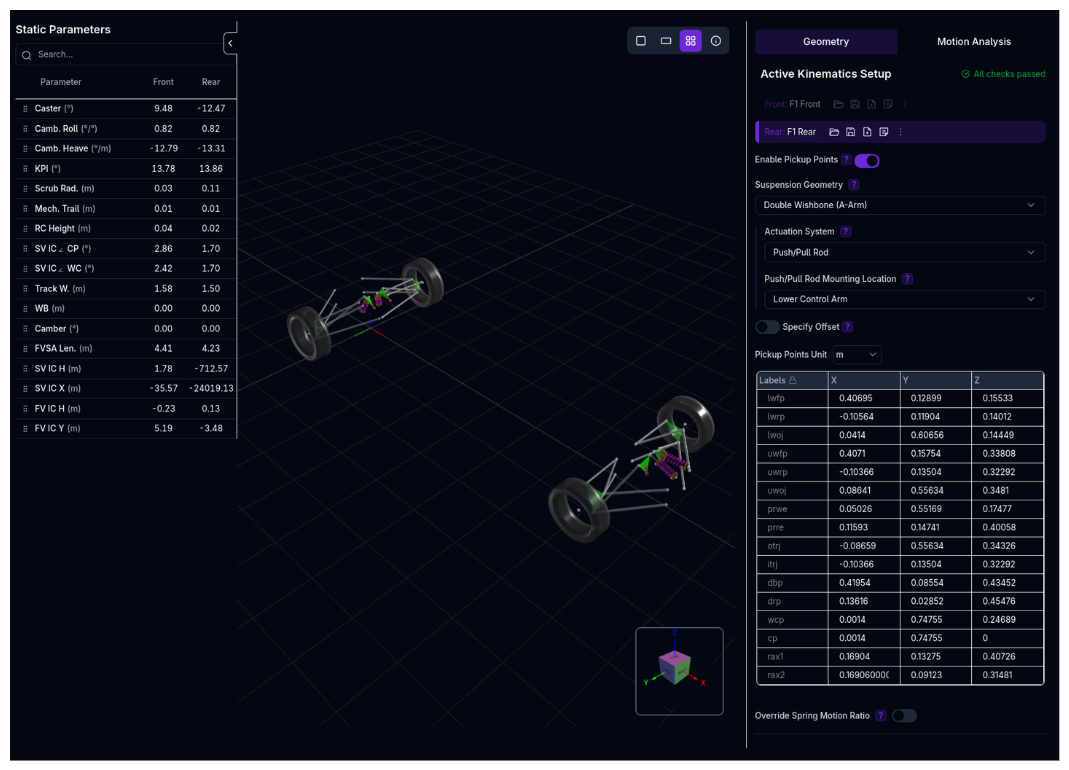 Configure your suspension geometry and analyze how your suspension moves throughout its range of travel. Define pickup points, analyze static parameters, or manually override kinematic curves.
Overview
The Kinematics setup defines:
- Suspension Type - Double wishbone (push/pull rod or direct acting) or McPherson strut
- Pickup Points - 3D coordinates of suspension mounting points and joints
- Static Parameters - Calculated geometric properties (camber, caster, roll centre height, etc.)
- Kinematic Curves - How suspension geometry changes with wheel travel
- Override Options - Manual control of any kinematic parameter vs wheel travel
Two Configuration Modes
Kinematics can be configured in two ways:
- Pickup Points (Automatic): Define 3D suspension geometry, platform automatically calculates all kinematic curves
- Manual Override: Directly specify kinematic curves (motion ratios, camber curves, etc.) without pickup points
Understanding Kinematics
What is Suspension Kinematics?
Suspension kinematics describes how suspension geometry changes as the wheel moves through its travel. As the suspension compresses (bump) or extends (rebound), the geometric relationships between suspension components change, affecting:
- Camber angle - Wheel tilt relative to vertical
- Toe angle - Wheel pointing in/out
- Motion ratios - Mechanical leverage between wheel and spring/damper
Why It Matters
Suspension kinematics directly impacts:
- Tyre contact patch - Camber and toe changes affect grip
- Mechanical grip - Roll centre location affects load transfer
- Ride quality - Motion ratios affect suspension response
- Handling balance - Kinematic curves differ front vs rear
Kinematics View Layout
The Kinematics page has two tabs:
1. Geometry Tab
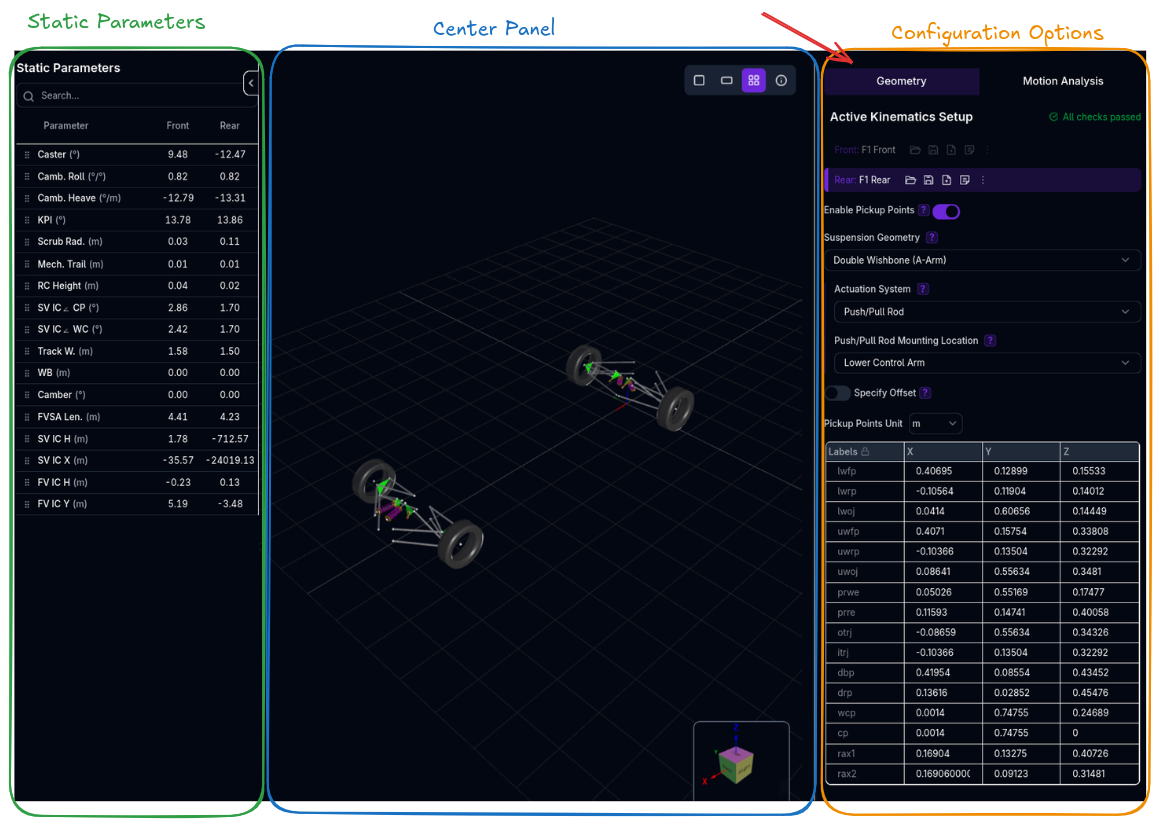
Left Panel (Collapsible): - Static Parameters Table - Real-time calculated geometric properties - Search and reorder parameters
Center Panel: - 3D Suspension Visualizer - Interactive view of suspension geometry - Shows pickup points, links, and current wheel position - Updates in real-time as you edit
Right Panel: - Configuration Options - Suspension type, pickup points, overrides
2. Motion Analysis Tab
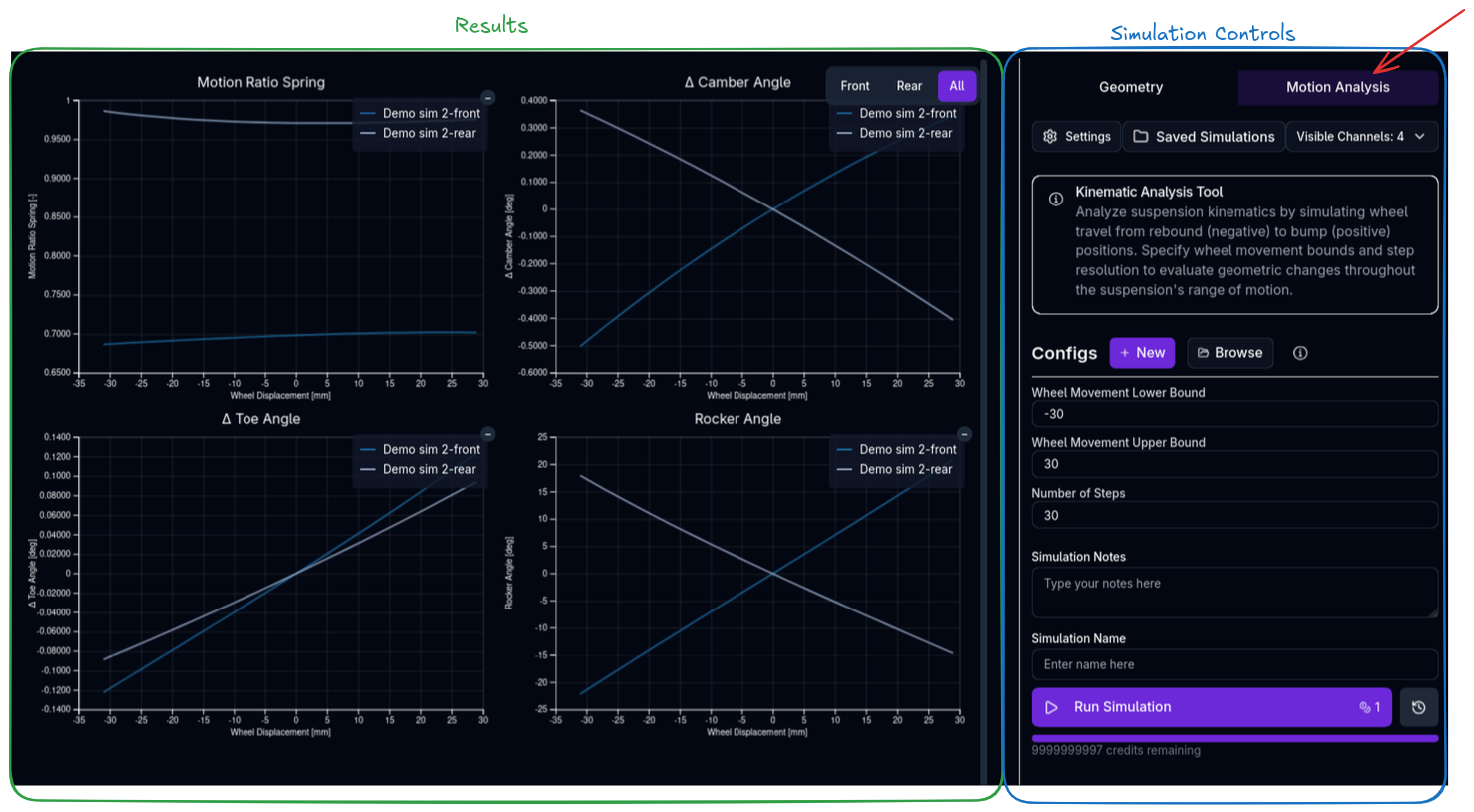
Center Panel: - Kinematic Curves - Plots of all kinematic parameters vs wheel travel
Right Panel: - Simulation Controls - Configure and run kinematic analysis - Wheel travel range and step resolution
Suspension Types
Double Wishbone Push/Pull Rod
The most common race car suspension. Uses upper and lower wishbones (A-arms) with a push rod or pull rod actuating a rocker and spring/damper.
Configuration options: - Mounting Point: Lower Control Arm (LCA), Upper Control Arm (UCA), or Upright - Actuation System: - Push/Pull Rod - Standard rocker coilover - Direct Acting Coilover - No rocker, direct mounting - ARB Type: None or U-Bar — when set to U-Bar, supply ARB axis pickup points for the solver to compute ARB twist, lever displacement, and motion ratio - Heave Type: None, Cross (rod), or T-Bar — each mode adds the appropriate heave spring pickup points automatically
Use when: - Formula cars, prototypes, high-performance sports cars - Maximum adjustability and tunability required - Advanced setup with rocker and motion ratio adjustment
Pickup points required: - Lower wishbone front/rear pivots (lwfp, lwrp) - Upper wishbone front/rear pivots (uwfp, uwrp) - Lower/upper wishbone outer joints (lwoj, uwoj) - Pushrod/pullrod wheel end (prwe), rocker end (prre) - Rocker axis (rax1, rax2), damper/bellcrank pivot (drp, dbp) - Track rod inner/outer joints (itrj, otrj) - Wheel centre (wcp), contact patch (cp) - For 3rd Spring: Heave spring rocker point (hsrp), heave spring bellcrank/body point (hsbp)
3rd Spring (Heave Spring) - BETA
The 3rd spring option adds additional pickup points for a heave spring connected to the rocker. This feature requires heave spring to be enabled in Suspension settings. This is commonly used in Formula cars and prototypes to control pitch and heave independently from roll.
Double Wishbone Direct Acting
Double wishbone with spring/damper mounted directly between chassis and wishbone (no rocker).
Configuration options: - Mounting Point: Lower Control Arm (LCA), Upper Control Arm (UCA), or Upright
Use when: - Simpler suspension without rockers - GT cars, touring cars, road cars - Space constraints prevent rocker installation
Pickup points required: - Same as push/pull rod except: - No rocker points (prre, rax1, rax2) - Damper/spring wheel end (dwp) instead of prwe
Torsion Bar Incompatibility
Direct acting suspension cannot be used with torsion bar springs. If torsion bar is enabled on an axle, direct acting options are disabled.
McPherson Strut
Simplified suspension using a strut (combined spring/damper) acting as the upper suspension member.
Use when: - Front-wheel drive cars, compact vehicles - Packaging constraints require compact suspension - Simpler suspension geometry acceptable
Pickup points required: - Lower control arm front/rear pivots (lcafp, lcarp) - Lower ball joint (lbj) - Upper strut point (usp), lower strut point (lsp) - Track rod inner/outer joints (itrj, otrj) - Wheel centre (wcp), contact patch (cp)
Configuration: Pickup Points Mode
Enabling Pickup Points
- Navigate to Geometry tab
- Toggle Enable Pickup Points switch
Recommendation
Run a standalone kinematic analysis first to verify geometry is correct before using pickup points in: - Lap Time Simulation - Ride Analysis - Handling Analysis - Calculations
Selecting Suspension Type
Use the Suspension Type dropdown to select:
Double Wishbone Push/Pull Rod: - DBL Wishbone Push/Pull Rod on Lower Control Arm - DBL Wishbone Push/Pull Rod on Upper Control Arm - DBL Wishbone Push/Pull Rod on Upright
Double Wishbone Direct Acting: - DBL Wishbone Direct Acting on Lower Control Arm - DBL Wishbone Direct Acting on Upper Control Arm - DBL Wishbone Direct Acting on Upright
McPherson Strut: - McPherson (direct acting on upright)
Mounting Point Explanation
- LCA: Pushrod/spring attaches to lower wishbone
- UCA: Pushrod/spring attaches to upper wishbone
- Upright: Pushrod/spring attaches directly to wheel carrier
Defining Pickup Points
Step 1: Set Coordinate Unit
Choose the unit for pickup point coordinates: - Millimeters (mm) - default - Meters (m) - Inches (in)
Step 2: Enter Pickup Points
The spreadsheet shows required pickup points for your suspension type. Enter X, Y, Z coordinates for each point.
Coordinate System: - Origin: Center of front axle at ground level - X-axis: Positive toward rear (longitudinal) - Y-axis: Positive toward left (lateral) - Z-axis: Positive upward (vertical)
See Coordinate System for details.
Example (Double Wishbone):
| Label | X (mm) | Y (mm) | Z (mm) |
|---|---|---|---|
| Lower Wishbone Front Pivot (lwfp) | 207 | 19 | 222 |
| Lower Wishbone Rear Pivot (lwrp) | -347 | 193 | 247 |
| Lower Wishbone Outer Joint (lwoj) | -13 | 712 | 175 |
| Upper Wishbone Front Pivot (uwfp) | 48 | 155 | 412 |
| Upper Wishbone Rear Pivot (uwrp) | -342 | 191 | 428 |
| Upper Wishbone Outer Joint (uwoj) | -42 | 670 | 349 |
Step 3: Optional Offset
Apply a global offset to all pickup points using Offset coordinates. Useful for: - Adjusting suspension position without re-entering all points - Testing sensitivity to pickup point location
Viewing Static Parameters
The left panel shows calculated static parameters in real-time:
Alignment: - Camber - Wheel tilt (negative = top tilted in) - Caster - Steering axis angle in side view - Toe - Wheel pointing angle (positive = toe out)
Geometry: - Kingpin Inclination (KPI) - Steering axis angle in front view - Scrub Radius - Offset of KPI axis from contact patch - Mechanical Trail - Caster offset at ground
Roll Centre: - Roll Centre Height - Virtual pivot point for body roll - Side View IC Angle (CP) - Anti-dive/anti-squat angle from contact patch - Side View IC Angle (WC) - Anti-dive/anti-squat angle from wheel centre
Instant Centre: - Front View IC Height - Front view instant centre height - Front View IC Y - Front view instant centre lateral position - Side View IC Height - Side view instant centre height - Side View IC X - Side view instant centre longitudinal position
Other: - Track Width - Distance between contact patches - Wheelbase - Distance to opposite axle - Front View Swing Arm Length (FVSA) - Virtual swing arm length - Wheelbase Migration - Wheelbase change with travel - Track Migration - Track width change with travel
Reordering Parameters
Drag parameters (using the grip icon) to reorder them in the table. Your custom order is saved.
Configuration: Manual Override Mode
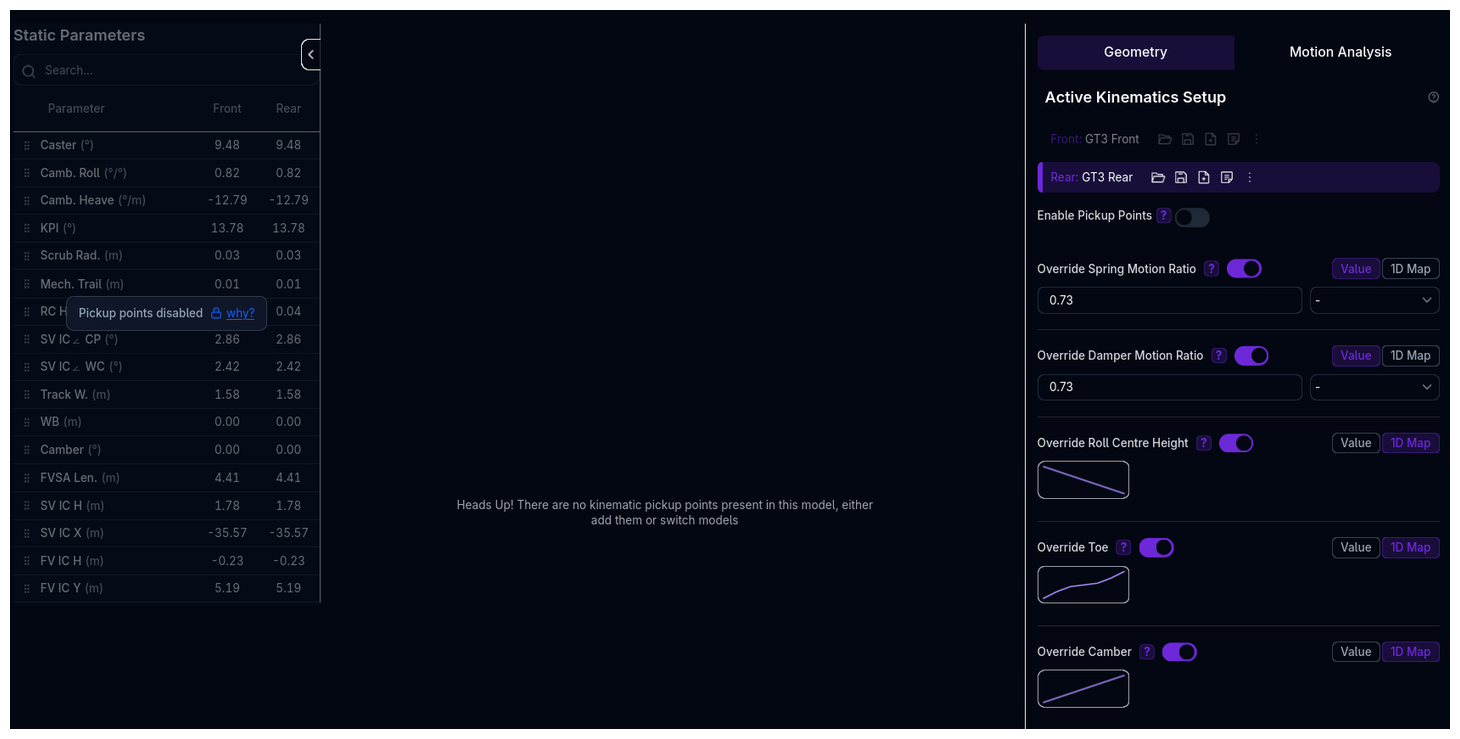
If pickup points are disabled, or if you want to override calculated curves, use manual override mode.
Available Override Parameters
Each parameter can be configured as: - Numeric - Fixed value (no variation with wheel travel) - Map1D - Curve defined vs wheel travel
Motion Ratios
Spring Motion Ratio: - Ratio of spring displacement to wheel displacement - Higher ratio = softer effective wheel rate - Typical range: 0.5 - 2.0
Damper Motion Ratio: - Ratio of damper displacement to wheel displacement - Usually similar to spring motion ratio - Typical range: 0.5 - 2.0
Heave Spring Motion Ratio: - Motion ratio for heave spring (if enabled) - Only shown if heave spring is active
Heave Damper Motion Ratio: - Motion ratio for heave damper (if enabled) - Only shown if heave damper is active
Torsion Bar vs Coilover
For torsion bar suspensions, spring motion ratio is in rad/m instead of m/m (angular displacement per wheel travel).
Alignment Parameters
Roll Centre Height: - Height of roll centre above ground - Affects lateral load transfer distribution - Typical range: -50mm to 500mm - Negative = below ground
Toe: - Toe angle change vs wheel travel - Positive = toe out, negative = toe in - Can cause bump steer if excessive
Camber: - Camber angle change vs wheel travel - Negative = top of wheel tilted in - Camber gain in bump improves cornering grip
Caster: - Caster angle change vs wheel travel - Positive = top of kingpin behind bottom - Usually relatively constant through travel
Instant Centre Angles
IC Angle (Contact Patch): - Side view instant centre angle from contact patch - Controls anti-dive (front) and anti-squat (rear) - Positive = IC ahead and above CP
IC Angle (Wheel Centre): - Side view instant centre angle from wheel centre - Alternative measurement of anti-dive/anti-squat
King Pin Inclination: - Front view steering axis angle - Affects steering feel and self-centering
ARB Motion Ratio
ARB Motion Ratio: - Ratio of ARB displacement to wheel displacement - Can be entered as a constant value or as a 1D curve vs. wheel travel for non-linear installations - Typical range: 0.3 - 2.0
ARB Type: - Architectural style of the anti-roll bar (e.g., blade, u-bar)
Heave Type: - Architectural style of the heave system (e.g., push/pull-rod heave)
Rack Limits: - Configurable steering rack travel limits
Heave Limits: - Configurable heave travel limits
ARB Motion Ratio Migration
The ARB motion ratio field on the Anti-Roll Bar setup page is being migrated to the Kinematics component, where it belongs geometrically. Define your ARB motion ratio here going forward.
Migration Parameters
Wheelbase Migration: - Change in wheelbase with wheel travel - Can affect pitch behavior
Track Migration: - Change in track width with wheel travel - Affects scrub and cornering geometry
Rocker Angle: - Rocker rotation angle vs wheel travel - Only relevant for rocker suspensions
Configuring Override Parameters
For each parameter:
1. Enable Override
Toggle Override [Parameter Name] switch
2. Choose Data Type
- Numeric: Enter single value
- Map1D: Define curve vs wheel travel
3. For Map1D: Define Curve
- X-axis: Wheel Travel (m)
- Negative = rebound (extension)
- Positive = bump (compression)
- Y-axis: Parameter value
- Define multiple points, platform interpolates
Example: Camber Curve
| Wheel Travel (mm) | Camber (°) |
|---|---|
| -30 | -1.5 |
| -20 | -1.8 |
| -10 | -2.0 |
| 0 | -2.2 |
| 10 | -2.3 |
| 20 | -2.5 |
| 30 | -2.6 |
This defines camber gain: wheel gains negative camber (good for cornering) as it compresses.
Interactive 3D Viewer
The Kinematics page features a fully interactive 3D suspension viewer that animates in real time.
Motion Sliders
Three sliders below the 3D viewer let you drive the suspension through its range of travel:
- Heave (mm) — Vertical displacement of the chassis
- Roll (°) — Body roll angle
- Steer (mm) — Rack displacement (front axle only, when steering geometry is defined)
Dragging any slider animates all pickup points to their interpolated positions in real time. Each slider has a Play/Pause button that auto-animates the full range. Only one motion mode can be active at a time.
Overlay Markers
Toggle buttons below the sliders control three overlay markers that update continuously:
- RC — Roll axis line connecting front and rear roll centres
- IC — Instant centre markers for all four corners (FL, FR, RL, RR)
- CG — Sprung centre of gravity sphere
Camera Presets
The viewer toolbar includes one-click camera presets:
| Preset | Shortcut | View |
|---|---|---|
| ISO | R | Isometric |
| TOP | T | Plan (bird's eye) |
| FRT | F | Front view |
| SDE | S | Side view |
An Orthographic toggle switches between perspective and orthographic projection.
Sparkline Sidebar
The left-hand parameter sidebar shows a compact sparkline curve for each channel, with a white dot tracking your current slider position. Values update instantly as you drag. Parameters are draggable for reordering and include a search filter.
Motion Analysis
Purpose
The Motion Analysis runs three concurrent sweeps per axle — heave, roll, and steer — and delivers results as a single precompute payload.
Live Precompute
A background precompute job fires automatically when you open the Kinematics page. Once complete, the Current toggle in the Analysis tab plots the live data directly — no need to run and stage a simulation first. Staged simulation results can be overlaid on top.
Sweep Mode
A sweep mode selector (Heave / Roll / Steer) controls which motion axis appears on the x-axis of all charts, with axis labels updating accordingly (Wheel Displacement mm, Roll Angle °, or Rack Displacement mm).
Configuration
Heave Limits: - Min/max wheel displacement for the heave sweep
Rack Limits: - Min/max rack displacement for the steer sweep (when steering geometry is defined)
Available Channels
Motion Ratios: - Spring Motion Ratio - Damper Motion Ratio - Heave Spring Motion Ratio (if applicable) - Heave Damper Motion Ratio (if applicable)
Alignment: - Camber - Toe - Caster - King Pin Inclination
Roll Centre: - Roll Centre Height - Side View IC Angle (Contact Patch) - Side View IC Angle (Wheel Centre)
Instant Centre: - Front View IC Height - Front View IC Y Position - Side View IC Height - Side View IC X Position
ARB: - ARB Twist Angle (aArbTwistF, aArbTwistR) - ARB Lever Displacement - ARB Motion Ratio (maArbF, maArbR)
Anti-Geometry: - Anti-Dive — percentage of front braking load transfer resisted by geometry - Anti-Lift — equivalent metric under rear braking - Anti-Squat — percentage of rear drive thrust load transfer resisted by geometry
Steer: - Ackermann Percentage — computed across the full rack travel range
Migration: - Halftrack Migration (per corner) - Wheelbase Migration (per corner)
Other: - Rocker Angle (if applicable) - Mechanical Trail - Scrub Radius - Front View Swing Arm Length
Comparing Results
Use Simulation Viewer Table to: - Load previous kinematic analyses - Compare different suspension geometries - Overlay curves from multiple runs
Validation Warnings
The platform validates suspension geometry and warns for:
Link Length Warnings: - Link length <5mm (suspiciously short) - Links should be >5mm for realistic geometry
Motion Ratio Warnings: - Spring motion ratio <0.3 (very low, very stiff wheel rate) - Spring motion ratio >2.0 (very high, very soft wheel rate) - Damper motion ratio <0.3 (very low) - Damper motion ratio >2.0 (very high)
Roll Centre Warnings: - Roll centre <-50mm (deep below ground, unusual) - Roll centre >500mm (very high, excessive jacking)
Instant Centre Warnings: - IC angle <0° (negative anti-dive/anti-squat) - IC angle >57° (very steep, >1.0 rad)
Geometry Warnings (Double Wishbone): - Wishbone chassis points coincident (zero-length axis) - Wishbone points collinear (no triangulation) - Upright points collinear (collapsed upright) - Rocker points coplanar (collapsed rocker) - Steering arm <20mm (very short, heavy steering)
Pushrod Attachment Warnings: - Pushrod attachment >upright length from outer joint (very far)
Geometry Warnings (McPherson): - LCA chassis points coincident - LCA points collinear - Strut points coincident - Knuckle points collinear - Steering arm <20mm
Viewing Warnings
Warnings appear in the Tree View next to the Kinematics component. Click the warning icon to view details.
How Kinematics Relates to Other Components
Chassis
Chassis defines the reference ride height where pickup points are measured. The platform automatically adjusts kinematics if Initialization ride height differs.
Suspension
Suspension references kinematics for each corner (FL, FR, RL, RR). Motion ratios from kinematics determine effective wheel rates and damper rates.
Initialization
Initialization defines race-ready ride height and static camber/toe. These are the baseline values; kinematics defines how they change with wheel travel.
Configuration Workflow
Recommended Workflow
1. Choose Your Approach
- Pickup Points: If you have suspension geometry data (CAD, measurements)
- Manual Override: If you have kinematic curves from testing/simulation
2. Configure Pickup Points (If Using)
- Select suspension type
- Enter pickup point coordinates
- Use 3D visualizer to verify geometry looks correct
- Check static parameters for sanity
3. Run Kinematic Analysis
- Switch to Motion Analysis tab
- Set wheel travel range (e.g., -30 to +30 mm)
- Run simulation
- Review all kinematic curves
4. Validate Geometry
- Check Tree View for warnings
- Address any geometry issues
- Verify curves are smooth and realistic
5. Override if Needed
- If pickup points produce unrealistic curves, use manual override
- Override specific parameters while keeping others from geometry
- Re-run analysis to verify
6. Use in Simulations
- Kinematics now ready for lap time, ride, handling simulations
- Platform automatically uses kinematic curves throughout vehicle dynamics
Tips & Best Practices
Start with Known Geometry
If possible, start with pickup points from CAD or measurements. This ensures physically realistic kinematics.
Run Standalone Analysis First
Always run a standalone kinematic analysis to verify geometry before using in full vehicle simulations. Catches geometry errors early.
Check Static Parameters
Static parameters (left panel) should match expectations. If camber is +10° instead of -2°, something is wrong with pickup points.
Smooth Curves are Good
Kinematic curves should be smooth. Sudden jumps or discontinuities indicate geometry problems.
Camber Gain is Critical
Camber gain in bump is one of the most important kinematic parameters. Aim for negative camber gain (wheel tilts in during compression) for better cornering.
Minimize Bump Steer
Toe change with wheel travel (bump steer) should be minimized. Excessive bump steer causes handling instability.
Validate with Real Data
If you have access to real suspension data (K&C rig, physical testing), validate your kinematics against it. Simulation is only as good as your input data.
Geometry Errors Cascade
Incorrect pickup points cause incorrect kinematics, which cause incorrect vehicle dynamics. Validate kinematics thoroughly before running complex simulations.
Solver Failures Indicate Problems
If kinematic analysis fails to solve, it usually means the geometry is physically impossible. Check warnings and adjust pickup points.
Related Topics
- Suspension Setup - Configure springs, dampers, and anti-roll bars
- Chassis Setup - Reference ride heights and dimensions
- Initialization Setup - Race-ready alignment and ride heights
- Coordinate System - Understanding the coordinate frame
- Cornering Simulation - Running cornering analysis
Suspension kinematics is the foundation of vehicle dynamics. Spend time getting it right—everything else builds on this.