Uploading .TIR Files
Beta Feature
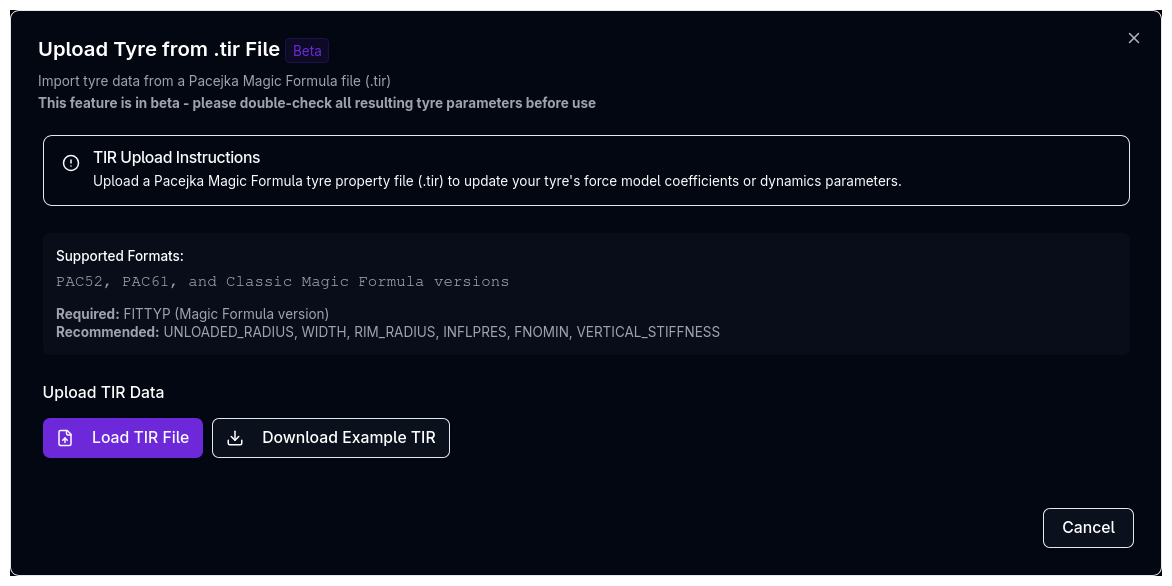
The .TIR upload is currently in beta. Please double-check all resulting tyre parameters before use in simulations.
What is a .TIR File?
A .TIR (Tyre Input Record) file is a standardised text format containing Pacejka Magic Formula coefficients and tyre properties. These files are typically provided by:
- Tyre manufacturers (Hoosier, Avon, Pirelli, etc.)
- Tyre testing facilities (Calspan, SUSPA, etc.)
- Formula SAE Tyre Testing Consortium (FSAE TTC)
- In-house tyre fitting from raw test data
Supported Formats
The platform supports two Pacejka Magic Formula versions for .TIR upload:
| Format | FITTYP Value | Description |
|---|---|---|
| Pacejka 5.2 | 52 | Industry-standard, most common |
| Pacejka 6.1 | 61 | Advanced with pressure effects |
The platform detects the model version automatically from the FITTYP field in the .TIR file.
FITTYP Compatibility
Many .TIR files use FITTYP values from other toolchains. The platform converts these automatically:
| FITTYP Value | Source | Converted To |
|---|---|---|
| 5 | MF-Tyre 5.0 / 5.1 | Pacejka 5.2 |
| 6, 21 | Other MF variants | Pacejka 5.2 |
| 52 | Standard Pac52 | Pacejka 5.2 (native) |
| 60, 62 | MF-Tyre 6.0 / 6.2 | Pacejka 6.1 |
| 61 | Standard Pac61 | Pacejka 6.1 (native) |
When a conversion is applied, a warning message indicates which version the file was converted from.
Pacejka Classic
The .TIR upload supports Pacejka 5.2 and 6.1 only. If your vehicle uses the Pacejka Classic model, you can still upload a .TIR file — the tyre model type will be changed to match the file's version. See Tyre Model Selection for more on model versions.
Upload Process
Step 1: Open the Upload Dialog
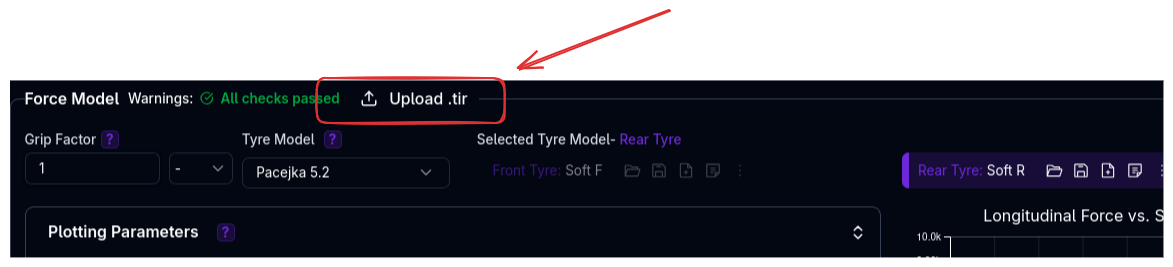
- Navigate to the Tyres page
- In the Force Model section, click the Upload .tir button in the header
- The upload dialog opens
Step 2: Load a .TIR File
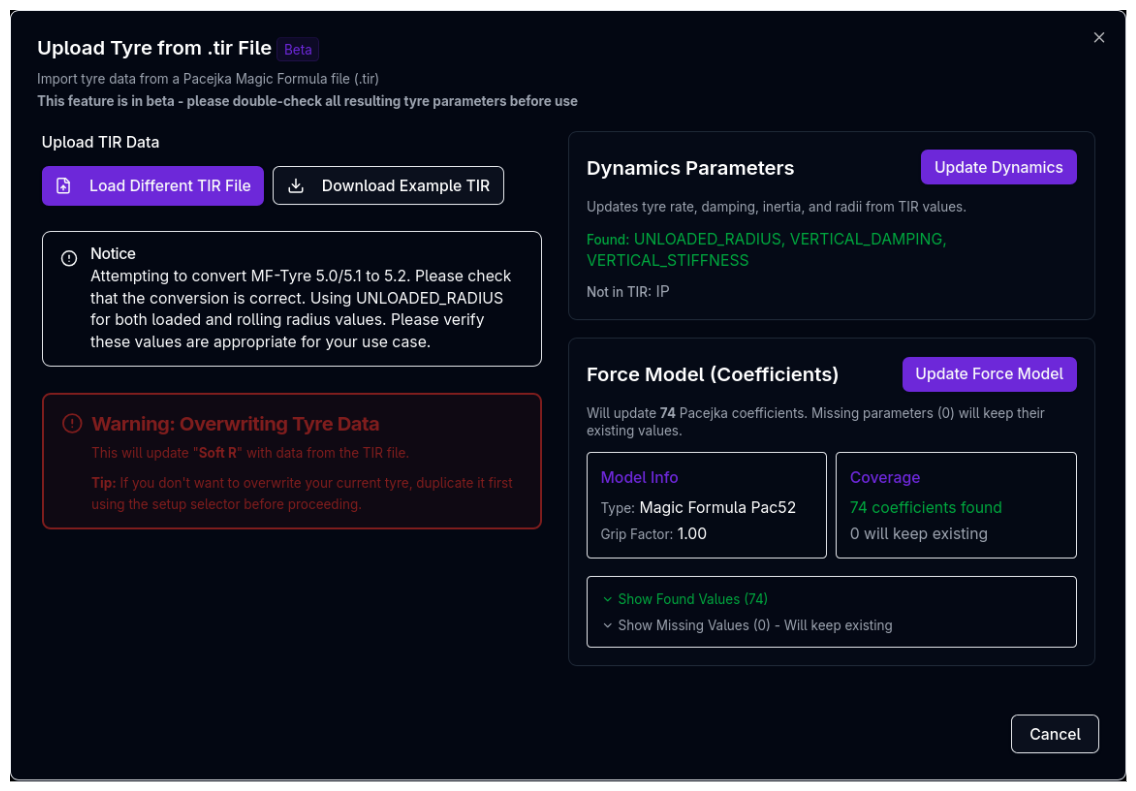
- Click Load TIR File
- Select a
.tirfile from your computer - The platform parses the file and shows a preview
The button changes to Load Different TIR File after a file is loaded, allowing you to switch files without closing the dialog.
What the Preview Shows:
The dialog splits into two sections after loading a file:
Dynamics Parameters Section
- Lists which dynamics properties were found in the .TIR file (e.g., UNLOADED_RADIUS, VERTICAL_STIFFNESS, VERTICAL_DAMPING)
- Lists which are missing and will not be updated
- Shows an Update Dynamics button (disabled if no dynamics parameters were found)
Force Model (Coefficients) Section
- Shows the detected model type (e.g., Magic Formula 5.2)
- Shows the parsed grip factor
- Shows coefficient coverage: how many were found vs. missing
- Expandable lists showing exactly which coefficients were found and which will keep their existing values
- Shows an Update Force Model button
Step 3: Review Warnings
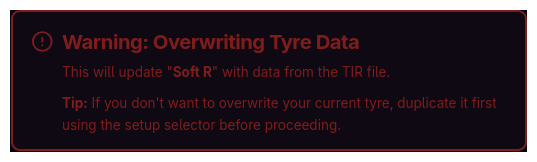
Before updating, review any warnings that appear:
- Overwrite warning — The update will modify the currently selected tyre model. Duplicate the tyre model first if you want to preserve the original
- Version mismatch warning — If the .TIR file model version differs from your current tyre model (e.g., file is Pac52 but tyre is set to Pac61), the model type will be changed automatically to match the file
- Conversion notice — If the FITTYP value was converted from another toolchain format (e.g., MF-Tyre 5.0 → Pac52)
- Radius assumption — When the file contains UNLOADED_RADIUS but no separate rolling radius, the same value is used for both loaded and rolling radius
Step 4: Update (Two Separate Actions)
The upload dialog provides two independent update buttons:
Update Dynamics
Updates tyre rate, damping, inertia, and radii from TIR values. Only available if the .TIR file contains dynamics parameters.
Parameters that can be updated:
| TIR Parameter | Maps To | Notes |
|---|---|---|
| UNLOADED_RADIUS | Loaded Radius (Value mode) | Also used for Rolling Radius if no separate value |
| VERTICAL_STIFFNESS | Tyre Rate | |
| VERTICAL_DAMPING | Tyre Damping Rate | |
| INERTIA (or IP, IYY) | Inertia | Multiple naming conventions supported |
Update Force Model
Updates all Pacejka coefficients found in the .TIR file. Missing coefficients keep their existing values.
When the model type matches your current tyre (e.g., both Pac52), existing values are preserved for any coefficients not present in the file. When the model type changes (e.g., Pac52 → Pac61), coefficients start from defaults for the new model and the file's values are applied on top.
Selective Updates
You can choose to update only dynamics, only force model, or both. This is useful when you want to import coefficients from a .TIR file but keep your manually configured dynamics parameters.
Step 5: Close
After updating, the button text changes to Done. Click it to close the dialog. The tyre page refreshes to show the updated values.
Download Example .TIR
If you don't have a .TIR file, you can download an example:
- Open the upload dialog
- Click Download Example TIR
- Use the downloaded file as a template
The example file contains properly formatted Pacejka 5.2 coefficients that you can modify with your own data.
.TIR File Structure
A .TIR file is a plain text file organised into sections with square bracket headers. Here's a simplified overview:
[MODEL]
FITTYP          = 52              $ Magic Formula version

[DIMENSION]
UNLOADED_RADIUS = 0.3135          $ Free tyre radius (m)
WIDTH           = 0.205           $ Nominal section width (m)
RIM_RADIUS      = 0.2286          $ Rim radius (m)

[VERTICAL]
VERTICAL_STIFFNESS = 200000       $ Tyre vertical stiffness (N/m)
VERTICAL_DAMPING   = 50           $ Tyre vertical damping (Ns/m)

[OPERATING_CONDITIONS]
INFLPRES        = 180000          $ Inflation pressure (Pa)
FNOMIN          = 3000            $ Nominal wheel load (N)

[LONGITUDINAL_COEFFICIENTS]
PCX1            = 1.5             $ Shape factor for longitudinal force
PDX1            = 1.2             $ Longitudinal friction Mux at Fz0
...

[LATERAL_COEFFICIENTS]
PCY1            = 1.3             $ Shape factor for lateral force
PDY1            = 1.1             $ Lateral friction Muy at Fz0
...

[OVERTURNING_COEFFICIENTS]
...

[ROLLING_COEFFICIENTS]
...
Key Fields
| Field | Section | Required | Description |
|---|---|---|---|
FITTYP |
MODEL | Yes | Magic Formula version (52 or 61) |
FNOMIN |
OPERATING_CONDITIONS | Recommended | Nominal wheel load (N) — maps to Fz0 |
UNLOADED_RADIUS |
DIMENSION | Recommended | Free tyre radius (m) |
VERTICAL_STIFFNESS |
VERTICAL | Recommended | Tyre rate (N/m) |
VERTICAL_DAMPING |
VERTICAL | Recommended | Tyre damping (Ns/m) |
INFLPRES |
OPERATING_CONDITIONS | Recommended (Pac61) | Inflation pressure (Pa) |
WIDTH |
DIMENSION | Optional | Section width (m) |
RIM_RADIUS |
DIMENSION | Optional | Rim radius (m) |
Coefficient Naming
The parser matches coefficient names case-insensitively. Both PCX1 and pcx1 are recognised. Parameters can also appear in commented lines prefixed with $.
Common Issues
"Failed to parse TIR file"
Causes:
- File is not a valid .TIR format
- Missing required
FITTYPfield - Encoding issues (use UTF-8 or ASCII)
- Corrupted or truncated file
Fix: Verify the file opens correctly in a text editor and contains the [MODEL] section with FITTYP.
"No dynamics parameters found"
Cause: The .TIR file doesn't contain UNLOADED_RADIUS, VERTICAL_STIFFNESS, VERTICAL_DAMPING, or INERTIA fields.
Fix: Many .TIR files only contain force model coefficients. Configure dynamics manually in the Dynamics & Alignment section.
Version mismatch after upload
Cause: The .TIR file model version differs from your current tyre model setting.
Fix: This is expected behaviour. The platform automatically changes the model type to match the .TIR file. If you need a specific version, ensure your .TIR file has the correct FITTYP value.
Missing coefficients after upload
Cause: The .TIR file doesn't contain all coefficients for the detected model version. Missing coefficients keep their previous values (when the model type hasn't changed) or use defaults (when the model type changed).
Fix: This is normal — partial .TIR files are common. The coverage summary shows exactly which coefficients were updated. You can manually adjust missing ones in the coefficient editor.
Low coverage percentage
Cause: The .TIR file contains few of the expected coefficients.
Fix: Check that the .TIR file format matches the detected model version. Some .TIR files use non-standard naming conventions that may not be recognised.
Tips & Best Practices
Always Duplicate First
Before uploading, duplicate your current tyre model so you can revert if needed. The upload overwrites the existing model's values.
Check Coverage Before Updating
Expand the found/missing coefficient lists to review exactly what will change. This is especially important when uploading a partial .TIR file.
Validate After Upload
Use the preview charts in the Force Model section to verify that force curves look realistic after importing new coefficients.
Update Selectively
You don't have to update both dynamics and force model. If your .TIR file has good coefficients but you've already calibrated dynamics from test data, only click Update Force Model.
Download Example First
If creating a .TIR file from scratch, download the example template to ensure correct formatting and section structure.
Related Topics
- Tyres Setup — Full tyre configuration including dynamics, force models, and coefficient editing
- Tyre Model Selection — Choosing between Pacejka Classic, 5.2, and 6.1
- Live Preview Charts — Validating force curves after upload