Ambient Conditions
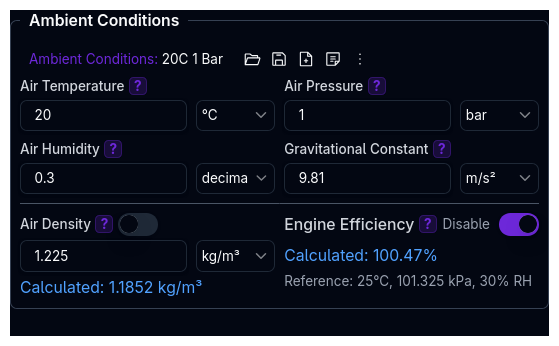
Configure the atmospheric and environmental conditions that affect aerodynamic performance and engine output.
Overview
Ambient Conditions is an independent library component located on the Track page. It has its own save/load functionality separate from the track configuration.
Sweep and Setup-Sheet Support
Numeric ambient conditions (such as temperature and pressure) can be varied in a Parameter Sweep and selected directly in the setup sheet, so you can study sensitivity to track conditions without leaving your simulation workflow.
Changes to ambient conditions affect:
- Aerodynamic forces — air density directly scales drag and downforce
- Engine performance — air density affects volumetric efficiency of internal combustion engines
Parameters
| Parameter | Unit | Description |
|---|---|---|
| Air Temperature | °C | Ambient air temperature. Affects calculated air density. |
| Air Pressure | Selectable pressure unit (including bar, mbar and inHg) | Atmospheric pressure. Affects calculated air density. |
| Air Humidity | 0–1 (0–100%) | Relative humidity as a fraction. Affects calculated air density. |
| Track Grip | 0–100% | Global grip multiplier applied at the tyres. 100% represents a fully gripping surface; lower it to model green, damp, or wet conditions. |
| Wind Speed | Selectable speed unit | Wind speed over the ground. See Wind. |
| Wind Direction | Selectable angle unit | Where the wind comes from, as a compass bearing clockwise from North (what a weather station reports). See Wind. |
Warnings
The Track section of the Tree View, and the Ambient Conditions heading on the Track page, show a warning when your conditions give an implausible air density or temperature — most often a pressure entered in the wrong unit.
Check your pressure unit
3866 Pa is not a sensible atmospheric pressure: it works out to an air density of about 0.034 kg/m³ and would scale engine power to roughly 3%. Check the unit beside the pressure field. Barometric pressure is often quoted in inHg, which you can select directly.
The warnings refresh when you save or select ambient conditions.
Track Grip
The Track Grip field applies a single global grip factor across the whole lap. It scales the grip available at the tyres and affects lap time, cornering, and handling simulations, giving you one knob to dial in track conditions without editing the tyre model.
Per-point grip vs. global grip
Track Grip is a single global multiplier in Ambient Conditions. It is separate from per-point grip, which varies along the lap and comes from either a Grip column supplied in track geometry data or the Local grip zones you draw in the Satellite Track Editor.
The two multiply rather than override one another: a Track Grip of 90% over a local zone of 0.8 gives an effective 0.72 on that stretch. Grip at the contact patch is the product of three things — the tyre model, per-point grip, and this whole-session figure.
Wind
Wind changes the airspeed the aerodynamic forces are computed at: a headwind adds to it and a tailwind takes it away. A crosswind adds aero yaw. The track map shows the wind as arrows drifting the way it blows, faster in a stronger wind.
Direction convention
Wind Direction is what a weather station reports: the compass bearing the wind comes from, clockwise from North. 0° is a northerly, 90° an easterly, 180° a southerly and 270° a westerly. Enter the station's figure as it is.
Only a track placed on a map has a real North. Every other track uses its +Y axis as North:
| Track source | North is | So |
|---|---|---|
| GPS (latitude/longitude), or placed in the satellite editor | True North, however the track is turned on the map | Enter the weather report directly |
| Distance + curvature | +Y: the left of the car at the start line, which runs along +X | A westerly (270°) is a tailwind on the start straight |
| Metric X/Y | The uploaded file's +Y axis | Bearings are relative to the file's axes |
How each simulation uses it
- Lap time (QSS) and Dynamic LTS apply the wind against the car's heading at each point of the lap, so the same wind is a headwind on one straight and a tailwind on the next.
vPitotis the airspeed the aero forces were computed at. - Straight line, cornering and YMD have no track, so the car faces East (+X): 90° is a headwind, 270° a tailwind and 0° blows from its left. Use these to study a steady head- or crosswind.
- The GGV envelope is built in still air: it has no heading to apply the wind against. In a lap simulation the wind therefore moves drag, top speed and ride heights at each point, but not the envelope's cornering grip.
- The optimal-control lap does not yet apply the wind at the car's heading on the track.
Air Density
Air density is calculated automatically from temperature, pressure, and humidity using the Magnus formula (WMO standard).
The calculation uses the ideal gas law for a mixture of dry air and water vapor:
Where:
R_d = 287.058 J/(kg·K)— specific gas constant for dry airR_v = 461.495 J/(kg·K)— specific gas constant for water vaporT— temperature in Kelvinp_dry— partial pressure of dry air (total pressure minus vapor pressure)p_vapor— partial pressure of water vapor, derived from humidity and the saturation vapor pressure (Magnus formula)
Override
You can toggle an override to enter a custom air density value directly. When overriding, the auto-calculated value is shown alongside for reference.
When to Override
Override air density when you have a measured value from the track (e.g., from a weather station or data logger) rather than relying on the formula.
Validation: Air density must be > 0 when overridden.
Engine Efficiency Multiplier
The engine efficiency multiplier models how changes in air density affect internal combustion engine power output.
It is calculated as the ratio of the current air density to a reference air density:
Reference conditions:
- Temperature: 25 °C
- Pressure: 100 kPa
- Humidity: 30%
At reference conditions the multiplier is 1.0 (100%). At higher altitudes or hotter temperatures, air density drops and the multiplier falls below 1.0, reducing engine power proportionally.
Disable Toggle
A toggle allows you to disable the engine efficiency multiplier, which sets it to 1.0 (100%). This effectively ignores altitude and weather effects on engine output.
Electric Vehicles
The engine efficiency multiplier only affects internal combustion powertrains. It has no effect on electric motors.
Validation
| Constraint | Rule |
|---|---|
| Air Temperature | Must be above absolute zero (> -273.15 °C) |
| Air Pressure | Must be positive (> 0) |
| Air Humidity | Must be between 0 and 1 |
| Track Grip | Must be between 0 and 100% |
| Air Density (override) | Must be positive (> 0) |
Related Topics
- Track Configuration — Track upload, filters, and processing
- Aerodynamics Setup — How air density affects drag and downforce calculations
- Powertrain Setup — Engine power affected by efficiency multiplier